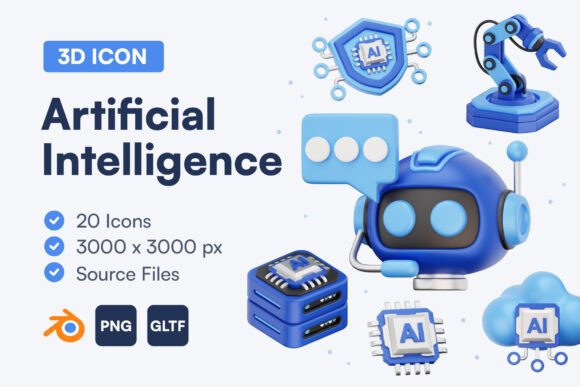
Artificial Intelligence 3D Icon Set
In the rapidly evolving world of digital design, first impressions are often formed in milliseconds. Whether you are building a mobile application, designing a landing page for a tech startup, or creating educational materials about machine learning, the visual elements you choose play a critical role in how your audience perceives your brand. This is where the Artificial Intelligence 3D Icon Set becomes an invaluable asset. It is not just a collection of images; it is a curated toolkit designed to bridge the gap between complex technological concepts and user-friendly interfaces.
For many designers, especially those who are new to 3D modeling or working under tight deadlines, creating custom three-dimensional assets from scratch can be a daunting task. It requires specialized software knowledge, significant time investment, and a keen eye for lighting and texture. By introducing this specific icon set into your workflow, you bypass these hurdles entirely. You gain immediate access to high-quality, professionally rendered graphics that add depth, modernity, and a unique eye-catching element to your designs without the steep learning curve.
Why Modern Interfaces Need Depth
Flat design has dominated the web for years, but there is a noticeable shift toward more tactile, immersive experiences. Users are drawn to interfaces that feel tangible and responsive. A 3D icon suggests interactivity and sophistication in a way that a flat vector simply cannot. When you use an Artificial Intelligence 3D Icon Set, you are signaling to your users that your product is current, polished, and technologically advanced.
Consider the typical symbols associated with AI: neural networks, robotic arms, brain circuits, data clouds, and chatbots. In two dimensions, these can sometimes look generic or overly technical. However, when rendered in 3D with soft lighting and smooth textures, they become approachable and engaging. This visual warmth helps demystify artificial intelligence for everyday users, making complex tools feel more accessible and less intimidating. This is particularly important for entrepreneurs and small business owners who want to adopt AI tools but need to present them in a friendly, consumer-facing manner.
What Is Included in the Package
Understanding exactly what you receive is crucial for integrating these assets into your projects efficiently. This set is designed with versatility in mind, ensuring that whether you are a beginner using drag-and-drop website builders or a professional developer coding custom interactions, you have the right file formats at your disposal.
- 20 Unique Icons: The collection covers the most essential aspects of artificial intelligence, from machine learning algorithms to automation and data processing.
- High Resolution: Each icon is rendered at 3000 x 3000 pixels. This ensures that your graphics remain crisp and clear on high-density Retina displays, large monitors, and even in print materials.
- Transparent PNG Files: These are ready-to-use images with transparent backgrounds. You can drop them directly into PowerPoint presentations, social media posts, or web layouts without needing any editing software.
- Source Files (BLEND): For those who use Blender, having the source files is a game-changer. You can adjust lighting, change colors to match your brand palette, or tweak angles to fit your specific composition.
- GLTF Files: This format is essential for web developers. GLTF allows you to load 3D models directly into websites with minimal performance impact, enabling interactive 3D experiences that respond to user mouse movements.
Practical Applications for Creators and Businesses
The utility of this icon set extends far beyond simple decoration. Here are several realistic scenarios where these assets can solve design problems and elevate your content.
Enhancing UI/UX Design
If you are designing a dashboard for an analytics platform, using 3D icons for navigation menus can help distinguish key features. For instance, a 3D brain icon for "AI Insights" stands out more effectively than a flat line drawing. It guides the user’s eye and improves navigation intuitiveness. The consistent style of the Artificial Intelligence 3D Icon Set ensures that your interface looks cohesive rather than cluttered with mismatched graphics.
Marketing and Social Media
Marketers and bloggers often struggle to find fresh visuals for articles about technology. Stock photos of people typing on laptops are overused. Instead, incorporating a vibrant 3D icon of a robot hand shaking a human hand can serve as a powerful featured image for a blog post about human-AI collaboration. These images perform well on social media platforms like LinkedIn and Instagram because they stop the scroll with their vivid colors and dimensional depth.
Educational Content
Educators and course creators can use these icons to break down complicated topics. When explaining how a neural network functions, placing a 3D node icon next to each step of the process helps visual learners retain information. The high resolution ensures that these icons look professional even when projected in a classroom or included in a printed workbook.
Important Considerations Before You Start
While these icons are designed to be user-friendly, there are a few best practices to keep in mind to maximize their impact. First, consider your color scheme. Since the icons are 3D, they interact with light and shadow. If your website has a dark mode, ensure the icons have enough contrast to stand out. If you have the BLEND source files, you can easily adjust the material properties to suit your theme.
Second, think about performance if you are using the GLTF files on a live website. While 3D on the web is exciting, it can slow down loading times if not optimized. Use these interactive elements sparingly on key landing pages rather than on every single page of your site. For static uses, such as email newsletters or PDF reports, stick to the high-resolution PNGs to ensure fast loading and universal compatibility.
Finally, remember that consistency is key. Do not mix these 3D icons with flat, hand-drawn sketches or pixel art unless you are deliberately aiming for an eclectic, collage-style aesthetic. For most professional projects, keeping all your graphical elements in the same 3D style will result in a more polished and trustworthy appearance.
By integrating the Artificial Intelligence 3D Icon Set into your design toolkit, you are not just saving time; you are investing in the perceived quality of your work. Whether you are a freelancer looking to impress a client, a startup founder building a brand identity, or an educator simplifying complex ideas, these assets provide the visual leverage needed to communicate effectively in a digital-first world.