Understanding the Bee Laser Engrave File: A Practical Guide for Makers and Professionals
For woodworkers, crafters, and digital fabrication enthusiasts, finding the right digital asset can be the difference between a mediocre project and a professional-grade piece of art. The Bee Laser Engrave File has emerged as a popular resource for those looking to incorporate intricate nature-inspired designs into their work. This high-quality bee-themed laser engrave PNG is specifically engineered for makers who demand precision, offering a ready-to-print solution that eliminates the hours typically spent on vector tracing or image optimization.
When evaluating digital files for laser engraving, it is essential to understand not just what you are buying, but how the file format influences the final output. This article explores the distinct characteristics of this specific bee design package, compares raster-based engraving files with traditional vector formats, and provides practical advice on when this type of resource is the most effective choice for your workflow.
What Distinguishes This Bee Design Package
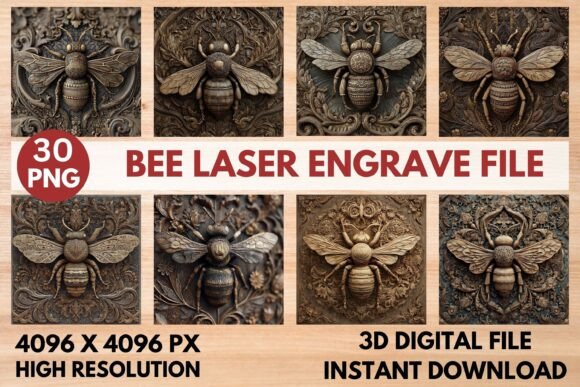
The core value of the Bee Laser Engrave File lies in its preparation. Unlike generic clipart found on free stock sites, these files are crafted with the physical limitations and capabilities of laser engravers in mind. The package includes both grayscale and coloring PNG files at a resolution of 4096x4096 pixels. This high resolution is critical because laser engravers interpret pixel density as power variation. A low-resolution image will result in pixelated, blocky engravings, whereas a 4K PNG ensures smooth gradients and fine detail.
Another significant feature is the inclusion of transparent backgrounds. For users working with software like Lightburn, xTool Creative Space, or Glowforge’s proprietary interface, a transparent background means no additional editing is required to isolate the subject. This saves time and reduces the risk of accidental engraving on unwanted areas of the material. The files are optimized for a wide range of machines, including CO2 laser cutters, diode lasers like Sculpfun, and fiber lasers, making them a versatile addition to any digital library.
Raster PNGs vs. Vector SVGs: Understanding the Tradeoffs
One of the most common questions among laser hobbyists is whether to use PNG (raster) files or SVG (vector) files. It is important to clarify that the Bee Laser Engrave File is not a layered SVG. This distinction is crucial for setting expectations and achieving the desired aesthetic.
Vector files, such as SVGs, are composed of mathematical paths. They are ideal for cutting shapes out of material or creating clean, solid-line engravings where every part of the design is either engraved or not. Vectors do not handle shading well without complex hatching patterns, which can look mechanical and lack depth.
In contrast, raster PNGs are grid-based images. When used for engraving, the laser interprets the brightness of each pixel to determine the power output. Black pixels receive full power, white pixels receive none, and gray pixels receive varying levels of power. This allows for photorealistic depth, subtle shading, and organic textures that vectors simply cannot replicate. The bee design in this package leverages this capability, offering a three-dimensional appearance on wood that mimics hand-carved relief.
However, this comes with tradeoffs. Raster engraving is generally slower than vector line engraving because the laser must scan every pixel in the area. Additionally, the result is highly dependent on the material’s surface consistency. If you need to cut out the bee shape itself, you would still need a separate vector file for the cut path, as this PNG set is intended strictly for surface engraving.
Material Compatibility and Machine Settings
To get the most out of the Bee Laser Engrave File, understanding material interaction is key. The files are best suited for lighter woods such as basswood, maple, birch, or bamboo. Darker woods like walnut or cherry may not show the subtle grayscale variations effectively, as the natural dark tone of the wood competes with the engraved marks.
For users of Glowforge machines, the recommended settings provide a solid starting point: a speed of 1000, power at 90, and grayscale mode with "Vary Power" enabled. Setting the quality to "Max" and ensuring an LPI (Lines Per Inch) of 270 or higher helps capture the fine details of the bee’s wings and body texture. It is advised to run a test pass on a scrap piece of the same wood batch, as moisture content and grain direction can significantly affect the outcome.
Lightburn users, who often prefer more granular control, should utilize the Jarvis dither filter. This algorithm distributes the grayscale values in a way that reduces banding and creates a smoother visual transition. Since the PNGs are high-resolution, using the original file size and scaling it down within the software is preferable to upscaling a smaller image, which can introduce artifacts.
Practical Applications and Use Cases
The versatility of this design extends beyond simple wall art. Here are several practical applications where the Bee Laser Engrave File excels:
- Home Decor: Engraved wooden coasters, trivets, or decorative plaques. The detailed shading adds a premium feel to everyday items.
- Tableware: Customized cutting boards or serving trays. The natural theme complements kitchen aesthetics, though food-safe finishes must be applied after engraving.
- Stationery and Gifts: Personalized journals, wooden bookmarks, or gift tags. The compact nature of the bee design fits well on smaller surfaces.
- Textiles: With appropriate power adjustments, these files can be used to engrave leather patches for hats or bags, adding a rustic, artisanal touch.
Each application requires slight adjustments in power and speed. For example, engraving on leather typically requires lower power to avoid burning through the material, while hardwoods may need multiple passes or higher power to achieve sufficient contrast.
When to Choose This File and When to Look Elsewhere
Deciding whether the Bee Laser Engrave File is the right choice depends on your specific project goals. This file is an excellent option if:
- You want a photorealistic or shaded effect rather than a simple outline.
- You are working with light-colored, fine-grained wood or leather.
- You prefer a plug-and-play workflow without spending time editing images in Photoshop or Illustrator.
- You have a laser machine capable of grayscale engraving (most modern diode and CO2 lasers).
However, you may need to explore other options if:
- You need to cut the shape out of the material. As noted, this is an engraving file, not a cut file.
- You are working with very dark or highly reflective materials where grayscale contrast is poor.
- You require editable layers to change specific elements of the design. These PNGs are flattened images and are not editable in the traditional sense.
- Your machine only supports basic on/off binary engraving without grayscale capability. While you can still use the file, the depth and detail will be lost.
Final Considerations for Buyers
Purchasing digital assets like the Bee Laser Engrave File is an investment in efficiency and quality. The package includes 15 coloring PNGs and 15 grayscale PNGs, providing ample variety for different projects and experimentation. It is important to remember that no physical item is shipped; the value is entirely in the digital data.
Buyers should be prepared to resize the files to fit their specific product dimensions. Since the files are high-resolution, they can be scaled down without loss of quality, but scaling up beyond 4096x4096 pixels may result in softness. Always check the aspect ratio of your target material to ensure the bee design is not distorted.
In conclusion, this bee-themed engrave set offers a robust solution for creators seeking professional results with minimal prep time. By understanding the strengths of raster-based engraving and matching the file to the right material and machine settings, makers can produce stunning, detailed artwork that stands out in a crowded market. Whether you are creating gifts for friends or products for sale, having a reliable, high-quality file like this in your toolkit simplifies the creative process and elevates the final product.